To report a fake Google review, open the review in Google Maps or your Business Profile, flag it through the three-dot menu, pick the violation that actually fits, back it with evidence, and escalate through support if the first flag fails. Fake reviews, ones from people who were never your customers, have the strongest case for removal, and Google review removal from The Reputation starts by confirming a review really is fake before we report it.
What counts as a fake Google review you can report?
A fake review is one that misrepresents a real customer experience, and that is exactly the kind Google will act on. This matters because Google removes reviews that break its prohibited and restricted content policies, not reviews that are simply harsh. Check your review against these categories before you report, because the fit decides your odds.
- Never a customer. A review from someone who never bought from you or visited your business. This is fake engagement, and it is the single strongest case you can bring.
- Competitor or grudge. A rival, a former employee, or anyone with a stake in tanking your rating. Google treats these as a conflict of interest.
- Coordinated attack. A sudden wave of 1-star reviews meant to manipulate your rating rather than describe real visits.
- Spam or advertising. Duplicated content, or a review written mainly to promote something or drive traffic elsewhere.
- Off-topic. A political rant, a personal dispute, or feedback that clearly belongs to a completely different business.
If your review fits one of these, you have a legitimate reason to report it. If it doesn't, the rest of this guide will still help, but be honest with yourself about which bucket you're in first.
How do I report a fake Google review, step by step?
You report a fake review to Google directly, then escalate with evidence when the case is strong. Google assesses reports through automated systems and, sometimes, human moderators. Follow these five steps in order, and don't skip the evidence step, because that's the one that separates a report that works from one Google quietly ignores.
Step 1: Find the review
Open your Business Profile in Google Maps or Google Search, or go to the reviews section of your Business Profile dashboard. Locate the specific review you believe is fake.
If it's part of a coordinated attack, take a screenshot of the cluster now, with dates and reviewer names visible. Those timestamps become your evidence in Step 4, and they're easy to lose once Google's feed shifts.
Step 2: Flag the review
Click the three-dot menu next to that review and choose the report or flag option. On Maps it may read "Report review"; in the dashboard it may read "Flag as inappropriate." Same action, different label.
This opens Google's reporting flow. You're now telling Google the review breaks a rule, so the next choice matters more than the flag itself.
Step 3: Pick the correct violation
Select the category that genuinely matches, such as fake engagement, spam, off-topic, or conflict of interest. Choosing the accurate reason matters far more than most people expect, because Google's system routes and weighs reports by category.
For a never-a-customer or competitor review, "fake engagement" or "conflict of interest" is usually the right call. Guessing or picking the most dramatic-sounding option can get your report dismissed on the wrong grounds. Match the violation to the facts.
Step 4: Attach or gather your evidence
Build the proof that the reviewer was never a real customer, because this is the weak point in the whole process. Anyone can click flag, which is exactly why a bare flag on a review that looks legitimate usually goes nowhere.
Strong evidence includes booking or transaction records with no matching name, screenshots documenting a coordinated 1-star wave, or a clear timeline that exposes a competitor or ex-employee. A fresh review with a clean paper trail is far easier to challenge than one you notice six months later, after the account has gone quiet. Gather it while the case is still fresh.
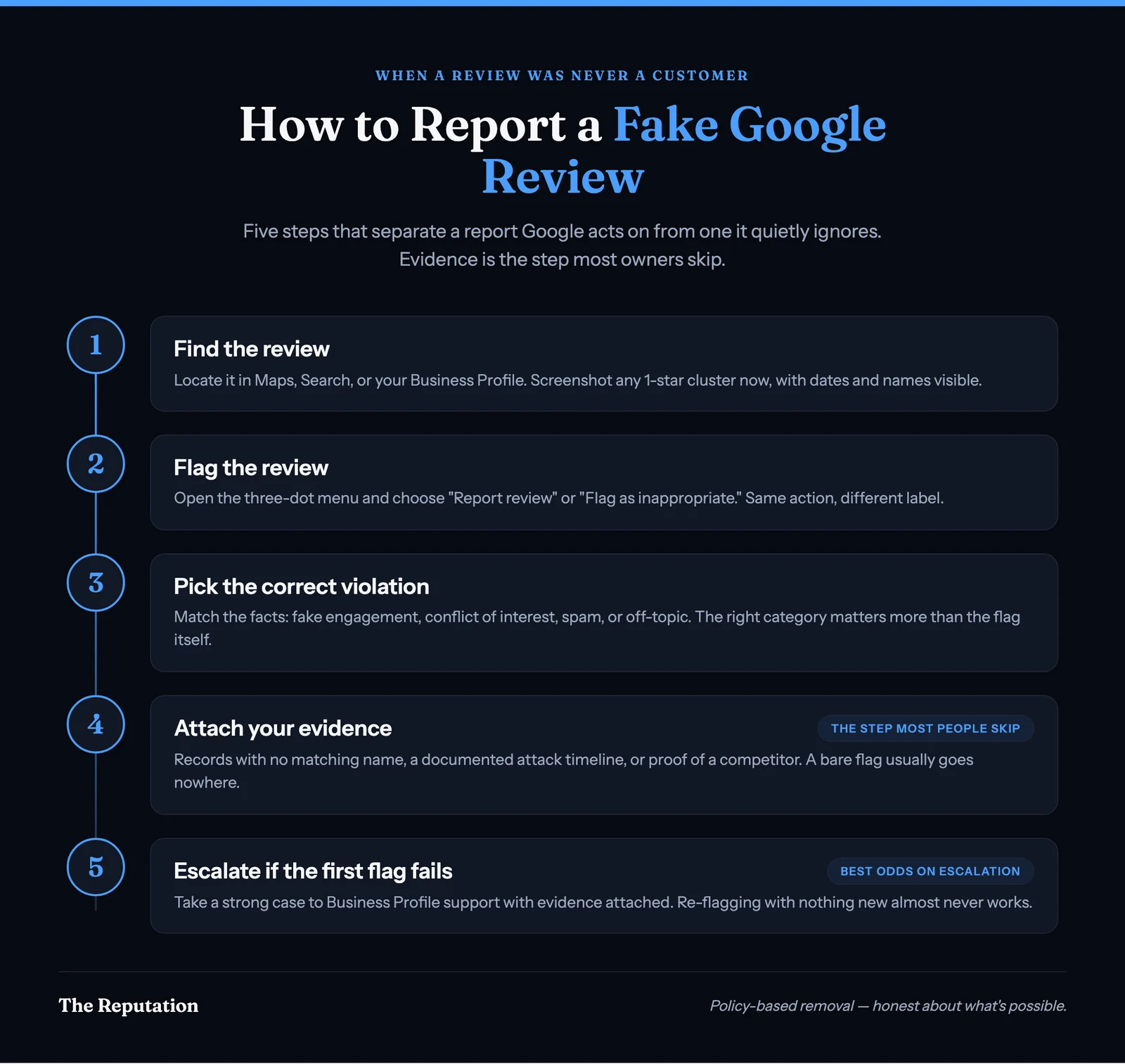
Step 5: Escalate if the first report fails
If the flag goes nowhere and you have a strong case, pursue it through Google Business Profile support. There you can sometimes get a support agent to review the report with your documented evidence attached, rather than relying on the automated pass alone.
This is where your Step 4 evidence earns its keep. A report backed by proof turns "this feels unfair" into "this violates a specific named policy, and here is why," which is the framing Google's process is actually built to act on. If the content is also defamatory or exposes private information, a legal removal path may exist, though that's fact-specific and worth a professional read first.
What happens when you report a Google review?
Google checks the review against its policies and removes it only if it breaks one. You can track that yourself, or have a removal team work it for you. To see where yours stands, open the Reviews Management Tool and check your status.
Your report lands in one of three places, and each one decides what happens next.
- "Decision pending." The review is flagged but not ruled on yet. That's why nothing on your listing has changed.
- A violation is found. Google removes the review, and it no longer shows on Maps or Search.
- "No policy violation." You get one appeal, but Google won't explain why it said no. Now you need the exact rule, plus proof the reviewer was never a customer.
That last outcome turns one button into a case file, and you only get one try. Google review removal from The Reputation does this every day. We know which policy fits, we build the evidence, and we work the appeal.
How long does it take, and what are the real odds?
There's no published timeline, and no guarantee. Some flagged reviews are assessed within a few days, others take weeks, and plenty are never removed at all. Google doesn't explain its decisions, so you're often left guessing why a report succeeded or stalled.
Here's the honest read on your chances. A fake review with solid evidence, records proving the person was never a customer, or a documented competitor attack, has a genuinely good shot at removal, especially on escalation. A borderline case with no proof is a coin flip at best. And a report filed under the wrong category, or against a review that isn't actually fake, usually goes nowhere.
The pattern we see most is owners re-flagging the same review over and over with nothing new attached, expecting a different result. It rarely comes. What moves a stuck report is fresh evidence and the correct policy category, not repetition. If your first two well-built attempts fail, that's the signal to escalate through support or get a specialist read, not to keep clicking flag. Our reputation management and monitoring work exists to catch and document policy-breaking reviews while the case is still fresh and winnable.
What if the review is negative but not actually fake?
Then reporting won't work, and it's better to know that now. Google will not remove a review just because it's negative, embarrassing, or bad for business. If a real customer had a real bad experience and wrote about it, no flag changes that, no matter how many times you file it.
This is frustrating, and it should also reassure you. The same policy that keeps a critic's honest review up is what protects your genuine positive reviews from being wiped out by a rival's mass-flagging. Trying to force an honest review down with false flags or fake counter-reviews doesn't just fail; it can get your Business Profile penalized or suspended, which is a far worse outcome than the one review you started with.
For an honest negative review, the durable fix is a calm, specific public response plus a steady flow of genuine positive reviews that outweigh it over time. That's the policy-safe route, and it's covered in our guide to what actually works when removing a Google review. If you're still not sure whether yours is fake or just unflattering, our breakdown of fake versus real reviews walks through the line in detail.
The questions we hear most about reporting a fake Google review, answered plainly.
Think a Google review is fake? Get an honest read
If a Google review looks fake and is hurting your business, the first step is confirming it actually breaks policy, because that decides whether a report has any chance of working. Start a case review with The Reputation and we'll tell you honestly whether it can come down, what evidence your case needs, and what to do about the reviews that are here to stay. Performance-based pricing applies to qualified removals: scope, eligibility, and timing are confirmed during your case review, and some content is legally or technically constrained, so we tell you what's achievable before you commit. This article is general information, not legal advice.
This article was written by The Reputation Team, the online reputation specialists at The Reputation.org. We handle policy-based review removal, reputation management, and monitoring for businesses and individuals, and we only pursue removals that fit a platform's published rules or the law.
Frequently asked questions
How do I report a fake Google review?
Open the review in Google Maps or your Business Profile, click the three-dot menu next to it, and choose the report or flag option. Pick the violation that fits, such as fake engagement, spam, off-topic, or conflict of interest. Reporting sends the review to Google for assessment. It is a request, not a guaranteed removal, so evidence that the reviewer was never a customer makes your case far stronger.
What counts as a fake Google review?
A fake review is one from someone who was never a real customer. That includes competitor-planted reviews, coordinated 1-star attacks, reviews meant to advertise something, and reviews left by a former employee with a grudge. Google treats these as fake engagement or a conflict of interest, which are policy violations you can report, unlike an honest negative review from a real customer.
How long does Google take to remove a reported review?
There is no published timeline. Some flagged reviews are assessed within a few days, others take weeks, and many are never removed. Google does not explain its decisions. A first report that fails can sometimes succeed on escalation when you attach stronger evidence and select the correct policy category the second time.
What if Google won't remove a review I reported as fake?
Escalate it. If the first flag goes nowhere and you have a real case, pursue it through Google Business Profile support, where a support agent can review the report with your documented evidence attached. If the content is defamatory or exposes private information, a legal path may exist. Documented proof and the correct policy framing are what move a stuck report forward.
Can I report a negative review that isn't fake?
You can, but Google won't remove an honest negative review just because it stings. Reporting only works when the review breaks a policy, such as being fake, spam, off-topic, or a conflict of interest. For a genuine 1-star from a real customer, the realistic play is a calm public response plus more genuine positive reviews over time, not a report that was never going to succeed.