You can't delete someone else's Facebook Recommendation yourself, but you can report it to Meta for a policy violation, or turn Recommendations off entirely to hide the whole feed. Which move is right depends on whether the Recommendation actually breaks Meta's rules or is just an honest complaint, and Facebook review removal from The Reputation starts with that honest read.

Are Facebook reviews the same as star ratings?
Not anymore. Facebook dropped its 1-to-5 star rating in 2018 and replaced it with Recommendations, a simple Yes or No plus a written post. Understanding that switch is the whole starting point, because it changes what you can report and how.
The number you still see on a business Page isn't a star average anyone picked. Facebook calculates a rating out of the Yes and No Recommendations people leave, then displays it as a score. So when a "bad review" is hurting you, what you're really dealing with is a written Recommendation, and that's what you flag.
This is where Facebook splits off from Google and Yelp. On Google review removal you're disputing a star review under Google's content policy; on Facebook you're reporting a Recommendation post under Meta's Community Standards. Same goal, different rulebook, and the wording of your report has to match Meta's rules to land.
What Facebook Recommendations will Meta remove?
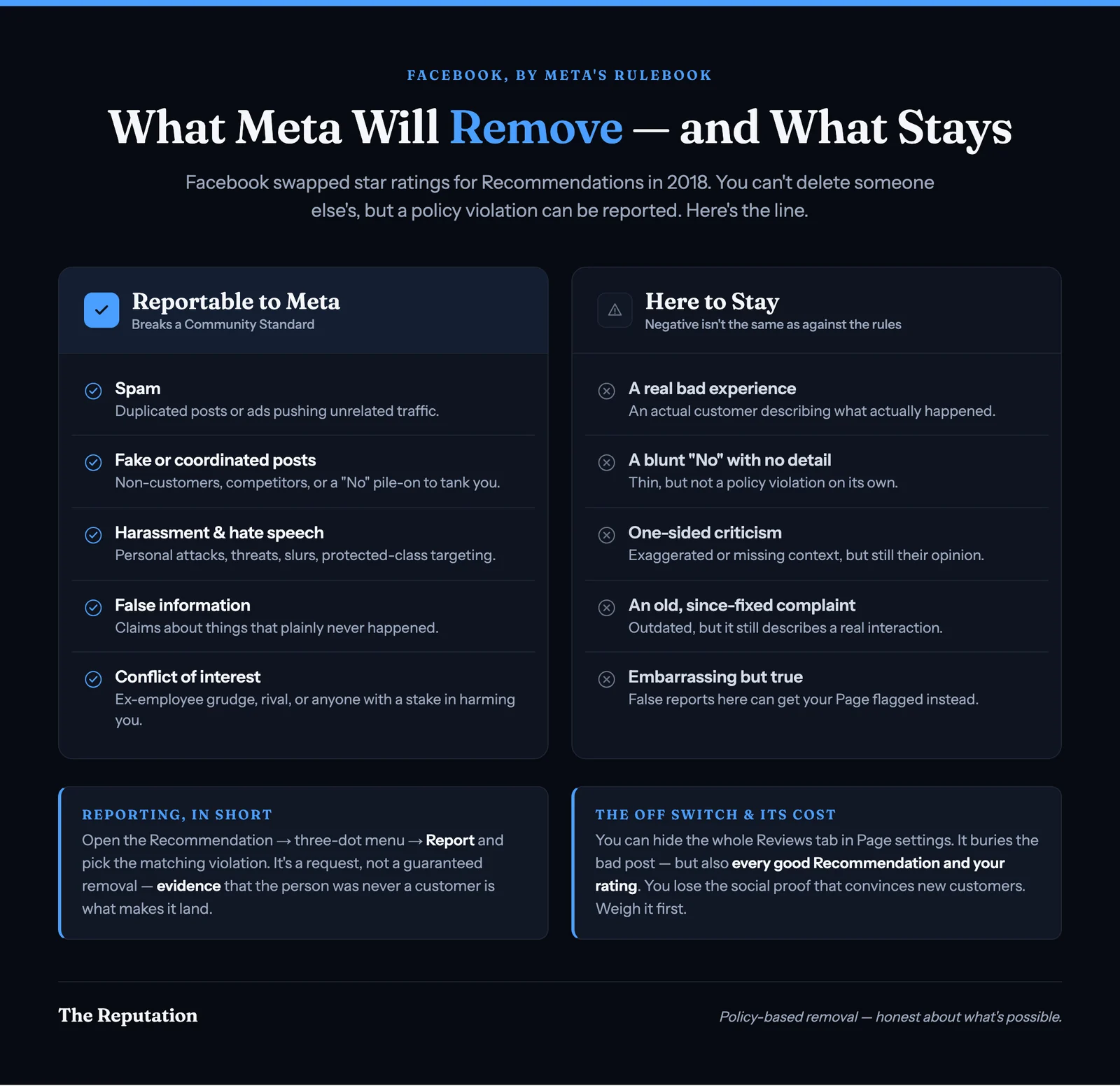
Meta removes Recommendations that break its Community Standards, not ones that are simply negative. Per Meta's Community Standards, content that violates a published rule has a real path to removal, and everything else stays. The categories that give you a legitimate basis to report:
- Spam. Duplicated Recommendations, the same content posted again and again, or a post written mainly to advertise something or push traffic somewhere unrelated to your business.
- Fake or coordinated posts. Recommendations from people who were never customers, posts planted by a competitor, or a sudden coordinated wave of "No" Recommendations meant to tank your rating rather than describe a real visit.
- Harassment and hate speech. Personal attacks, threats, slurs, or content targeting someone based on a protected characteristic.
- False information. A Recommendation that states things about your business that plainly did not happen, especially from someone with no record of ever being a customer.
- Conflict of interest. Posts from a former employee with a grudge, a competitor, or anyone with a personal stake in making you look bad.
The thread through all of these is that the Recommendation misrepresents a real customer experience or breaks a conduct rule. Back your report with evidence, such as records proving the person was never a client, and your odds climb. Our broader review removal work applies this same policy logic across Yelp, Google, Trustpilot, and Glassdoor, each with its own version of these rules.
What Facebook Recommendations won't come down?
Meta won't remove a Recommendation just because it's negative, embarrassing, or bad for business. If it describes a real interaction with your company, it stays, and reporting it over and over won't change that. That includes:
- A real customer who had a genuinely bad experience and wrote about it
- A blunt "No" Recommendation with little or no explanation
- Criticism you feel is one-sided, exaggerated, or missing context
- An old Recommendation about a problem you've since fixed
- A complaint that's embarrassing but factually true
It's frustrating, and it should also be reassuring. The same rule that keeps a critic's honest post up is what stops a rival from mass-reporting your good Recommendations off your Page. A platform that deleted feedback on demand would be useless to the customers who rely on it.
Trying to force honest posts down anyway, through false reports or a wave of fake positive Recommendations, doesn't just fail. It can get your Page flagged or restricted, which is far worse than the one Recommendation you were trying to remove. That's why an honest answer to "can this come down" is sometimes no.
How do I report a Facebook Recommendation, step by step?
If a Recommendation breaks Meta's rules, you report it directly, then escalate with evidence when the stakes justify it. Here's the process from your business Page:
- Find the Recommendation. Go to your Page, open the Reviews or Recommendations tab, and locate the specific post you want to challenge.
- Open the menu. Click the three-dot menu in the top corner of that Recommendation.
- Choose report. Select the report or "find support" option, then pick the category that genuinely fits, such as spam, harassment, or false information.
- Submit and note it. Send the report to Meta and keep a screenshot with the date. Meta reviews it through automated systems and, sometimes, human moderators.
- Escalate if it fails. If the first report goes nowhere and you have a strong case, pursue it through Meta's Business Help Center, where you can sometimes get a case reviewed with documented evidence attached.
The weak point in this whole process is evidence. Anyone can click "report," which is exactly why a bare report on a post that looks legitimate usually goes nowhere. A removal request lands far harder when it's backed by proof, such as records showing the person was never a customer, screenshots of a coordinated attack, or a timeline that exposes a competitor.
Timing matters too. A fresh Recommendation with a clear paper trail is easier to challenge than one you notice six months later, after the account has gone quiet. Building that evidence and running the escalation well is the part most owners don't have time for, and it's where our reputation management and monitoring work comes in, catching and documenting policy-breaking posts while the case is still fresh.
Should I turn off Facebook Recommendations entirely?
You can, and sometimes you should, but it's a blunt instrument with a real cost. Turning Recommendations off in your Page settings hides the entire Reviews tab, so the bad post disappears from public view along with everything else.
Here's exactly what the switch does. In your Page settings, under Templates and Tabs (or Privacy, depending on your Page setup), you can remove the Reviews or Recommendations tab. Once it's off, no one can leave a new Recommendation, existing ones stop showing publicly, and the calculated rating drops off your Page.
The tradeoff is the catch. You don't just hide one bad post, you hide all your good ones and the social proof that helps convince a stranger to trust you. For a Page with dozens of genuine positive Recommendations, switching them off to bury a single critic usually costs more than it saves.
When it does make sense: a brand-new Page with almost no Recommendations getting hit by a coordinated attack, or a situation where the feed is overwhelmingly unfair and you're rebuilding trust through other channels. Weigh what you'd lose before you flip it, because you can turn the tab back on later, but the Recommendations that were there don't all return the same way.
What should I do about an honest Recommendation I can't remove?
Reply to it in public, professionally, then earn enough genuine positive Recommendations to outweigh it. Since Meta won't remove an honest negative post, the goal shifts from deletion to damage control and long-term reputation building.
A calm public reply does two jobs. It shows the unhappy customer you take the feedback seriously, which occasionally prompts them to update or soften the post. More importantly, it speaks to every future customer who reads that Recommendation later, and most people expect a business to have a few unhappy ones. What they're really judging is how you handle them.
From there, the durable fix is volume and recency. A steady flow of recent, genuine "Yes" Recommendations pulls your calculated rating back up and pushes an old negative one down the feed, without breaking a single rule. That policy-safe route is the backbone of any reputation management plan worth paying for, and it's also how you protect the rest of your social media presence over time.
The questions we hear most about removing Facebook reviews and Recommendations, answered plainly.
Want to know if your Facebook Recommendation can actually come down?
If a Facebook Recommendation is hurting your business, the first step is knowing whether it breaks Meta's Community Standards and can be reported off, or whether it's an honest post you'll need to reply to and outweigh instead. Start a case review with The Reputation and we'll tell you honestly what can come down, what can't, and what to do about the Recommendations that are here to stay. Performance-based pricing applies to qualified removals: scope, eligibility, and timing are confirmed during your case review, and some content is legally or technically constrained, so we tell you what's achievable before you commit. This article is general information, not legal advice.
This article was written by The Reputation Team, the online reputation specialists at The Reputation.org. We handle policy-based review and Recommendation removal, reputation management, and monitoring for businesses and individuals, and we only pursue removals that fit a platform's published rules or the law.
Frequently asked questions
Does Facebook still have star ratings?
No. Facebook replaced its 1-to-5 star rating in 2018 with Recommendations, which are Yes or No plus a written post. The number you see on a Page today is a rating Facebook calculates from those Recommendations, not from stars anyone chose. That matters when you report content, because you're reporting a written Recommendation for a policy violation, not disputing a star count.
How do I remove a bad Facebook Recommendation?
You can't delete another person's Recommendation yourself. Open the Recommendation, click the three-dot menu, and choose the report option, then pick the violation that fits, such as spam, harassment, or false information. Reporting sends it to Meta for review; it's a request, not a guaranteed removal. If the whole feed of Recommendations is hurting you, you can also turn Recommendations off entirely in your Page settings.
What happens if I turn off Facebook Recommendations?
Turning Recommendations off in your Page settings hides the entire Reviews or Recommendations tab, so no one can leave new ones and existing ones stop showing publicly. It removes the bad Recommendation from view, but it also removes all your good ones and the visible rating. It's a real option when the feed is doing more harm than good, but you lose the social proof that helps convince new customers, so weigh that tradeoff before flipping the switch.
Will Meta remove a Facebook Recommendation just because it's negative?
No. Meta removes content that breaks its Community Standards, such as spam, hate speech, harassment, or a Recommendation from someone who was never a customer. An honest negative Recommendation from a real customer describing a real experience almost always stays up. The realistic play there is a calm public reply and enough genuine positive Recommendations to outweigh it over time.
Can Facebook Recommendations be left by people who never visited my business?
Yes, and that's one of the strongest grounds for removal. Facebook doesn't verify that a person was ever a customer before they post. A Recommendation from a competitor, a former employee with a grudge, or someone who has never used your business can be reported as false information or a conflict of interest. Records showing the person was never a customer make that report much harder to ignore.